Every meeting,
wherever it happens.
Around a table with the phone in the middle, on a client's call from your own computer, across the desk from someone you are interviewing. One recording, then minutes, a transcript you can check, answers with citations and actions you approve.
- Phone, watch, Mac and Windows
- No bot in any meeting
- Nothing sent until you approve it
Pick the one that sounds like your week.
In-person meetings
The meeting in a room, recorded on the phone on the table. No laptop open, no call to start, no bot. The minutes, the transcript and the follow-up come back when you stop.
Read the use case → Client meetingsClient meetings
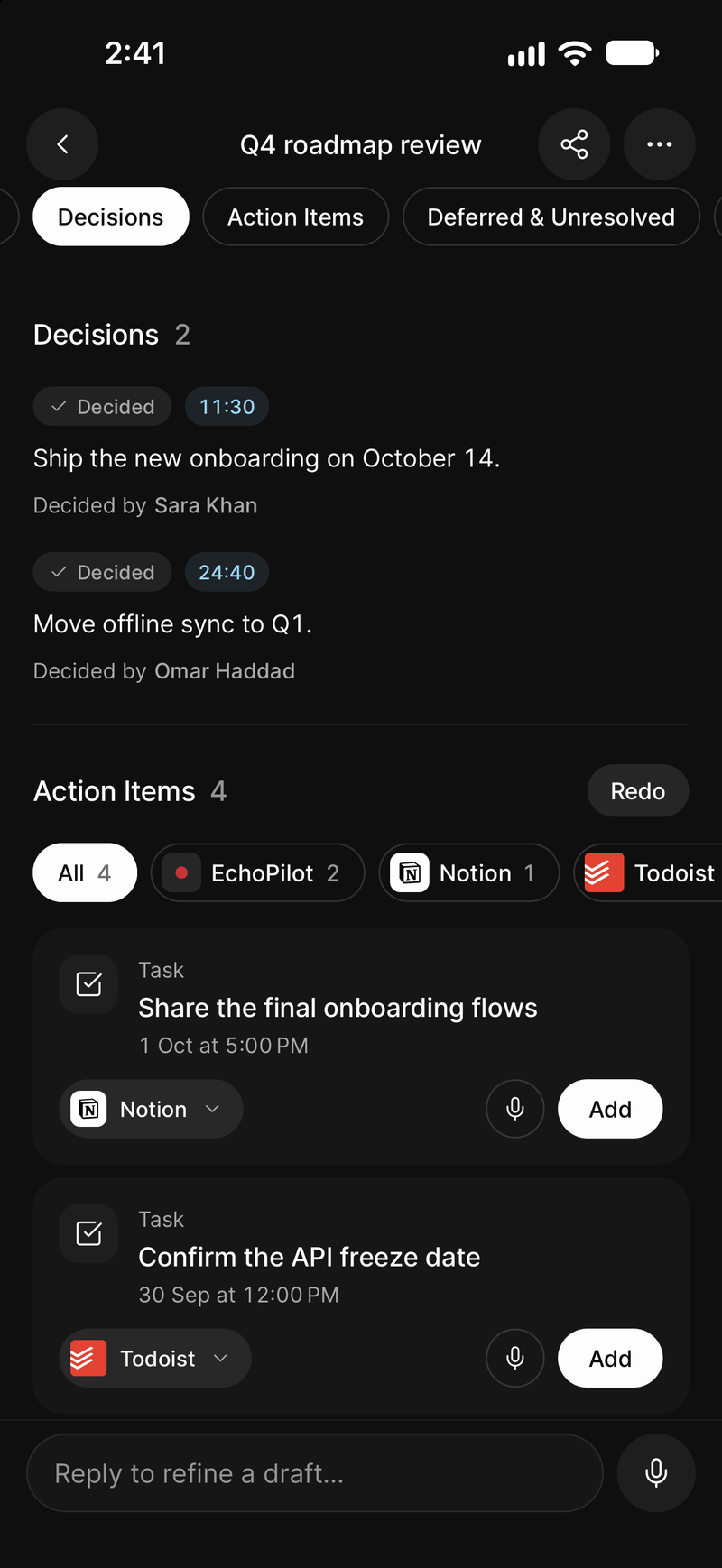
For consultants, agencies and account managers. The client meeting recorded without a bot, written up as minutes you can send, with every promise drafted as a task, an event or an email that waits for your approval.
Read the use case → InterviewsInterviews
For research, hiring and reporting. Record the interview in the room or on a call, read a timestamped transcript you can check against the audio, and find any answer across every interview you have recorded.
Read the use case → For real estate agentsFor real estate agents
Record showings, buyer consultations and listing appointments on your phone, and client video calls on your computer with no bot. EchoPilot writes Real estate notes with the client's requirements, the budget, each property and its feedback, the offers and the follow-ups, and drafts every follow-up for your approval.
Read the use case → For doctor appointmentsFor doctor appointments
Record a doctor's appointment on your phone, or a video visit on your computer. EchoPilot writes Doctor visit notes with the medicines and how to take them, the tests, the plan, the follow-ups and the warning signs, each tied to the moment it was said, so you can check the exact words.
Read the use case → ZoomRecord Zoom meetings
Record a Zoom call on the computer you take it on, with nothing added to the meeting. EchoPilot writes the minutes, the transcript and the follow-up.
Read the use case → Microsoft TeamsRecord Microsoft Teams meetings
Record a Microsoft Teams call on the computer you take it on, with nothing added to the meeting, and send the follow-up to the Microsoft apps you already use.
Read the use case → Google MeetRecord Google Meet calls
Record a Google Meet call from any browser on your computer, with nothing added to the meeting. EchoPilot writes the minutes, the transcript and the follow-up.
Read the use case → Use caseAI meeting notes
The problem with meeting notes is not writing them. It is what happens afterwards. EchoPilot writes them and drafts the follow-up work, ready for your approval.
Read the use case → Use caseMeeting recorder
A recorder that survives four hours, a locked screen, an incoming call, no signal and a crash. In the room or on a video call, with no bot and no extra hardware.
Read the use case → Use caseMeeting summary
A summary you can check. Every key point carries the timestamp it came from, so you can hear the sentence rather than trusting the paraphrase.
Read the use case → For studentsFor students
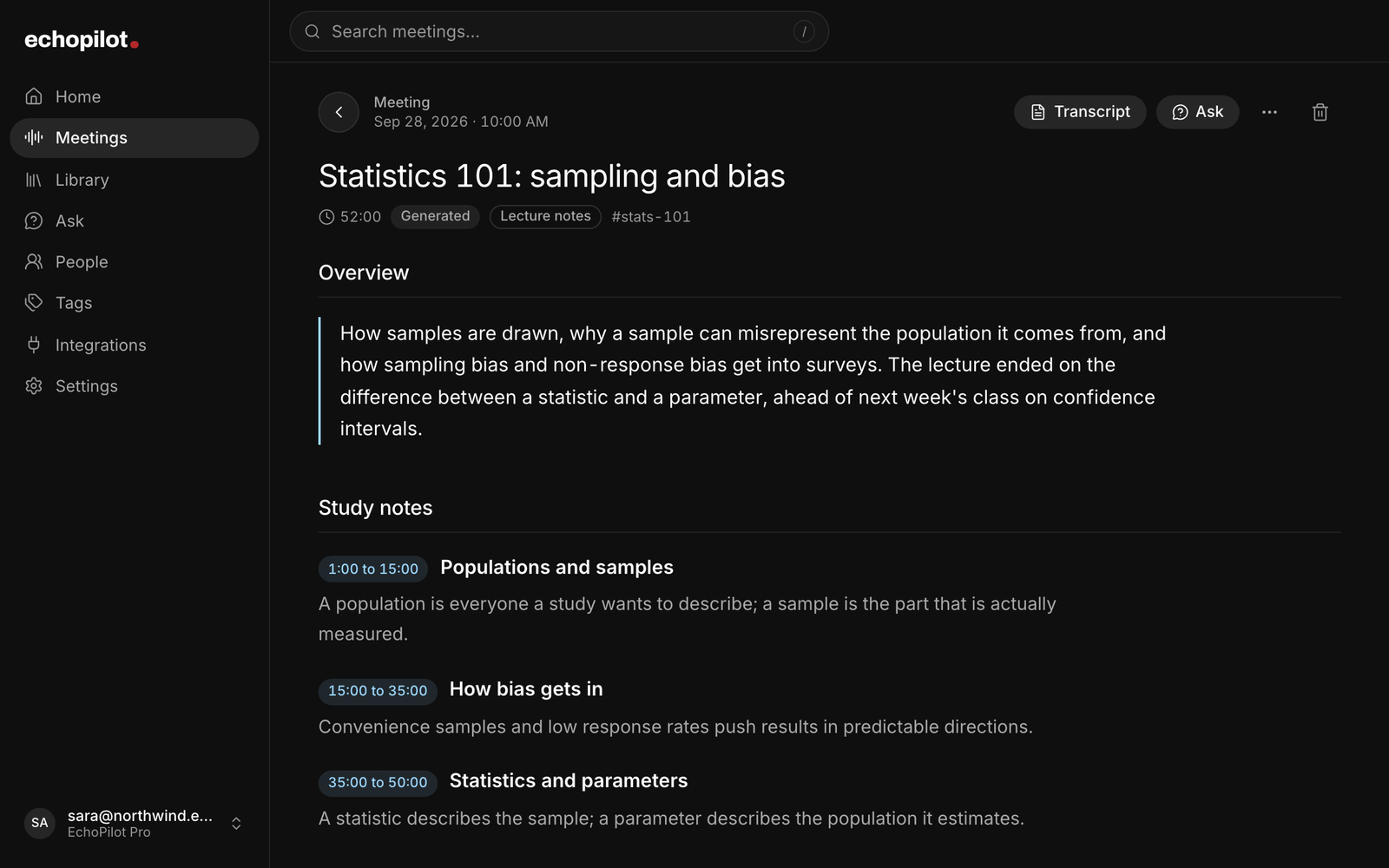
Record the lecture on your phone or your computer. EchoPilot writes study notes by topic, pulls out the key concepts, definitions and deadlines, and answers your questions with the moment cited.
Read the use case →Nothing to set up per situation.
A meeting in a room, a client call and an interview go through the same pipeline. The recorder is whichever device is with you: the phone on the table, the Mac or Windows app for a call, or an Apple Watch for the conversation on the way out. Audio is written to disk as it goes, and nothing joins the meeting.
What comes back is the same every time: Meeting Minutes with key points tied to the moment they were said, a transcript you can search, play and correct, Ask for questions across everything you have recorded, and an action card for every commitment, created only when you approve it.
What changes is the shape of the notes. EchoPilot reads what each recording is about and picks the template that fits, so a lecture comes back as lecture notes with definitions and deadlines, and an interview as each question with its answer.
Try it on the next meeting on your calendar, or the one that is not on it.
Record it on the device already in front of you. Minutes, transcript, answers and drafted actions when you stop.
Questions? support@echopilotapp.com